
Flying goose logo Open platform
  • Language
    • 简体中文
    • English

Developer access guide instructions

  • Guide
  • Special statement
  • Request public parameter description
  • Return to public parameter description
  • Open platform management rules

Interface list

  • Add printer【Required】
  • Small ticket machine print order
  • Label machine printing order
  • Delete printer
  • Modify printer information
  • Empty orders to be printed
  • Check order status
  • Query the number of printer orders
  • Query printer status
  • Get the device type information

SDK download

  • SDK download

Interface return value

  • Interface return value

Developer access guide instructions

The steps for developers to access the API are as follows. For more detailed information, please join the QQ group: Feie Cloud API Open Platform Group 6: 580316262 (New Group)


Step 1: Register a developer account

Go to https://developer.de.feieyun.com/ (hereinafter collectively referred to as'feieyun backend') to register a developer account and get UKEY. Account and UKEY are important identification parameters for developer API access.


Step 2: Docking API

  1. 1. [Mandatory] Add printer to developer account (can be batched) Open_printerAddlist
    Note: You must add SN and KEY to developer account before printing (check the printer label). Developers can manually add it on the Feige management background page, or through This interface program is added.
  2. 2. [Required] Print order Open_printMsg
  3. 3. Delete printer (can be batch) Open_printerDelList
  4. 4. Modify printer information Open_printerEdit
  5. 5. Empty the queue to be printed Open_delPrinterSqs
  6. 6. Query whether the order is printed successfully Open_queryOrderState
  7. 7. Query the order statistics of a certain printer on a certain day Open_queryOrderInfoByDate
  8. 8. Query the status of a printer Open_queryPrinterStatus

Special statement:

1. Request URL:
The corresponding interface requests the corresponding URL.
Please refer to the interface documentation for details.

2. Each The parameters of a request consist of two parts: public parameters and private parameters. For details, please see the corresponding description below.

3. The returned results are all data in json format.

4. Each of the following interfaces only lists the private parameters and the data parameters that return the results. For others, please see the description of the request and return public parameters.

Special note: The request written by the developer is submitted in the form of data, the request header needs to use Content-Type: application/x-www-form-urlencoded, please do not submit the data in other ways.

5. Download the relevant SDK and click to view

Request public parameter description:

All requests must pass parameters.
Parameter name Required Type Description
user Y string The registered user name of Feiye Cloud background.
stime Y int The current UNIX timestamp, 10 digits, accurate to the second.
sig Y string After concatenating the parameter user+UKEY+stime (the + sign indicates the connector), perform SHA1 encryption to obtain the signature, which is a 40-bit lowercase string.
apiname Y string The requested interface name.
debug N string debug=1 returns data in non-json format. Only used for testing.

Return to public parameter description

Return parameter name Type Description
ret int The return code, the correct return is 0, [Note: Please use this return parameter to judge whether the result is correct or not] , the error return is non-zero.
msg string The result prompts a message, correctly returns "ok", if there is an error, returns an error message.
data Not specify For the data type and content, please refer to the private return parameter data. If there is an error, return null.
serverExecutedTime int Server program execution time, unit: milliseconds.

Feie Cloud Printing Service Agreement

Dear User

These Terms of Service constitute a valid agreement between Guangzhou Dazao Information Technology Co., Ltd. (hereinafter referred to as “the Company”) and you regarding the Feie Cloud Printing Service (hereinafter referred to as “the Service”). To obtain the Service, the user (hereinafter referred to as “you”) indicates full acceptance of all terms of the Service by checking the “Agree” button during the registration of a Feie Cloud account.

The Company may update these Terms of Service at any time. Once the Terms of Service are changed, the Company will post the modified content on the relevant page. The revised Terms of Service shall effectively replace the original ones upon being published on the page. You may visit www.feieyun.com at any time to review the latest Terms of Service. Before using the various services provided by the Company, you shall carefully read these Terms of Service. If you do not agree to these Terms of Service and any revisions made by the Company from time to time, please stop using the Service.

1.Declaration and Commitment

1. You confirm that, before registering as a Feie Cloud user, you have fully read, understood and accepted all contents of this Agreement. Once you use the Service, it means you agree to comply with all provisions of this Agreement.

2. You agree that the Company reserves the right to unilaterally change the contents of this Agreement at any time and announce such changes by posting a notice on this website without separate notification to you. If you continue to use the Service after the revised Agreement is announced, it means you have fully read, understood and accepted the revised contents and will use the Service in accordance with the revised Agreement. If you do not agree to the revised contents, you shall stop using the Service.

3. You declare that, when you accept this Agreement and register as a Feie Cloud user, you are a natural person, legal person or other organization with full civil rights capacity and capacity for civil conduct as prescribed by law, capable of independently bearing civil liability; the contents of this Agreement are not prohibited by your country or region. If you do not meet the foregoing conditions, you shall immediately terminate registration or stop using the Service.

2.Registration

Before using the Service, you must first register to obtain a “Feie Cloud Account” (hereinafter referred to as “the Account”) provided by the Company. You agree:

1. To provide accurate information as prompted by the Service registration form and promptly update your correct, latest and complete information after obtaining the Account. If the Company has reasonable grounds to suspect that the information you provided is incorrect, false, outdated or incomplete, the Company reserves the right to suspend or terminate the provision of part or all of the Service to you. The Company shall not be liable for any consequences, and you shall bear any direct or indirect expenses arising therefrom.

2. If the Service cannot be provided or errors occur due to your failure to update information in a timely manner, you shall not claim compensation and shall bear all consequences arising therefrom; the Company shall not be liable.

3. You are responsible for your Account, which may only be used by yourself and is non‑transferable, non‑gifted and non‑inheritable. You agree that if you lose all or part of your civil rights capacity or capacity for civil conduct, the Company may dispose of information related to your Feie Cloud Account in accordance with valid legal documents (including but not limited to effective court judgments and effective wills).

3. Account Security

You shall be fully responsible for all operations and statements made using your Account and password. You agree:

1. The Company identifies your instructions through your username and password. Please keep your username and password properly. You shall be solely responsible for losses caused by password disclosure. You undertake not to disclose the Account and password to anyone else, nor use any other person’s Feie Cloud Account and password.

2. If you find that your Account and password are being used fraudulently or without proper authorization, you shall immediately notify the Company in an effective manner and request the suspension of relevant services. Meanwhile, you understand that the Company needs a reasonable period to take action upon your request, and the Company shall not be liable for executed instructions and/or losses caused before such action.

3. Service exception handling: When using the Service, interruptions may occur due to network system issues, ISP connection problems or other force majeure. You ensure that the information you entered is correct. If the Company cannot promptly notify you of follow‑up transaction handling due to incorrect information during such exceptions, the Company shall not be liable for damages.

4. You agree that, for operational and security reasons, the Company may temporarily suspend or restrict part of the Service’s functions or provide new functions. As long as you continue to use the Service, you agree to this Agreement or the revised version.

4. Service Content

1. “Service” in these Terms means the cloud printing services displayed on www.feieyun.com and related technical and network support services provided by Feie Cloud.

2. Services provided by Feie Cloud must comply with these Terms of Service.

5. Service Fees

1. The settlement method and pricing standard of Feie Cloud services shall be based on the prices published on the official website, calculated in RMB, unless otherwise agreed by both parties.

2. You understand and agree that Feie Cloud currently provides free cloud printing services; you do not need to pay fees to activate or use the Service. Feie Cloud reserves the possibility of charging fees in the future, and will announce the charging policy 30 calendar days in advance via website notice or in‑site notification. If you continue to use the Service, you shall pay fees in accordance with the then‑effective policy and terms.

3. Feie Cloud reserves the right to withhold or terminate services and/or technical support before full payment is made, and to pursue legal liability for overdue payments under postpaid services.

4. You understand that all complimentary services or activities are one‑time special offers outside normal service prices. Benefits do not include modification, update or maintenance costs, and complimentary services cannot be offset against service fees.

6. Rights and Obligations

1. Your Rights and Obligations

1.1. You agree to comply with these Terms and relevant management rules displayed on the service page. You understand that such terms and rules may be updated from time to time. If any part of these Terms is revised, Feie Cloud will give 30 days’ prior notice on www.feieyun.com. If you disagree with the revision, you may stop using the Service; Feie Cloud will settle any applicable fees and you shall export your business data. Continued use constitutes acceptance of the revised Terms.

1.2. You shall pay corresponding service fees as prompted on the page and stipulated in these Terms.

1.3. You undertake:

1.3.1. To obtain necessary permits or approvals from relevant state authorities if your business or non‑business activities using the Service require them.

1.3.2. Not to modify, translate, adapt, rent, sublicense, distribute online or transfer the Service or software provided by Feie Cloud, nor reverse‑engineer or attempt to discover source code, unless expressly permitted by Feie Cloud.

1.3.3. To comply with applicable license agreements if the Service involves third‑party software.

1.3.4. Not to use Feie Cloud’s resources and services to store or print the following content or facilitate others in publishing such content:

- Political propaganda or news information in violation of state regulations;

- nformation involving state secrets and/or security;

- Feudal superstition, obscene, pornographic, indecent or crime‑abetting information;

- Illegal Internet activities such as gambling, private servers and cheats;

- Information violating national ethnic and religious policies;

- Information harming Internet operation security;

- Information infringing others’ legitimate rights and interests or harming public order and morality;

- Other content violating laws, regulations or national policies.

1.3.5. Not to occupy excessive Feie Cloud service resources or cause service inaccessibility.

1.3.6. Not to alter or attempt to alter system configuration or damage system security.

1.3.7. Not to engage in other illegal or breach activities.

1.3.8. If Feie Cloud finds you in breach, it may take measures including immediate termination, suspension or deletion of relevant information. If a third party challenges or complains about you, Feie Cloud will notify you. You must provide explanations and evidence within the specified time; failure to do so will result in the above measures. Failure to contact you due to outdated or incorrect contact information is deemed a failure to respond.

1.4. You are responsible for the integrity and confidentiality of data stored on Feie Cloud and passwords for accessing products and services. All losses caused by improper maintenance or disclosure shall be borne by you.

1.5. You shall provide Feie Cloud with contact persons and management staff for your network and cloud platform, and assist as necessary. You shall update such information online and notify Feie Cloud promptly in case of changes. You are responsible for untrue, inaccurate or incomplete information and acts or omissions of such personnel.

1.6. You are responsible for data content stored on Feie Cloud. All consequences and liabilities arising from uploaded public information violating laws, regulations or policies shall be borne by you.

1.7.You understand and acknowledge that Feie Cloud only conducts formal review of registration materials based on ordinary knowledge standards and reserves the right to conduct random checks and require supplementary or updated materials.

1.8. You understand Feie Cloud cannot guarantee flawless service but undertakes to continuously improve quality. You agree that flaws unavoidable under current industry standards do not constitute a breach by Feie Cloud.

1.9. Feie Cloud does not guarantee full backup of user order data and shall not be liable for backup operations or results.

2. Rights and Obligations of Feie Cloud

2.1. Feie Cloud shall provide services in accordance with these Terms.

2.2. Feie Cloud provides 6×8 telephone support and online support (including WeChat, QQ, email, etc.) for paying users.

2.3. Feie Cloud provides 7×24 fault maintenance and timely troubleshooting, except for causes attributable to you, force majeure or matters beyond Feie Cloud’s control.

2.4. You understand Feie Cloud may perform necessary maintenance (including upgrades and server migration), which may cause temporary service interruptions.

7. Storage and Deletion of User Data

1. Order data you store on Feie Cloud remains your property. Feie Cloud will not use or disclose such data without authorization except for necessary statistical analysis, unless:

1.1. Disclosure is required by law or administrative/judicial authorities;

1.2. You and Feie Cloud otherwise agree in writing;

1.3. Disclosure is necessary due to your violation of Chinese laws and regulations;

1.4. Disclosure is necessary to provide requested software or services, limited to the necessary scope and subject to third parties’ confidentiality obligations at least as strict as these Terms.

1.5. Feie Cloud does not guarantee the storage period of printed order data. Unprinted order data will be stored for 1–7 natural days and automatically deleted thereafter.

8. Intellectual Property and Other Legal Risks

1. You warrant that order data submitted to Feie Cloud, your use of the Service and results generated do not infringe any third party’s legitimate rights and interests. If a third party makes a claim or lawsuit against Feie Cloud based on infringement, you shall indemnify Feie Cloud for all expenses and losses.

2. If a third party challenges or complains about intellectual property rights related to your use of the Service, you shall provide relevant proof and cooperate with Feie Cloud in handling complaints.

3. You acknowledge that all intellectual property rights in materials, technology, software and services provided by Feie Cloud belong to Feie Cloud or third parties. You may not copy, distribute, transfer, license or make such resources available to others without explicit permission.

4. If your data or use of the Service causes losses to others, you shall bear full compensation liability. Feie Cloud reserves the right to recover from you any compensation, fines, attorney fees and other losses paid to third parties.

9. Confidentiality Clause

1. Confidential information means all technical and non‑technical information disclosed by one party to the other, including but not limited to product information, plans, pricing, financial and marketing plans, business strategies, customer information, R&D materials, software and hardware, API data, technical specifications, designs, formulas and algorithms.

2. Each party agrees to keep confidential information confidential and restrict access by employees. Confidential information may not be disclosed except as required by law or if it has entered the public domain.

3. Both parties recognize confidential information as important assets and agree to protect it. In case of leakage, both parties shall cooperate to mitigate damages.

4. This Clause shall survive the termination of these Terms.

10. Term and Termination

1. The Service term shall terminate early if:

1.1. Both parties agree to early termination;

1.2. You materially breach these Terms (including non‑payment or serious violation of law), and Feie Cloud terminates the Service without refunding paid fees;

1.3. Feie Cloud suspends or terminates the Service due to network security risks (including viruses, intrusions and DDOS attacks). Fees will be calculated by actual months used (partial month counted as full month), and remaining fees (if any) will be refunded.

1.4. Feie Cloud terminates these Terms by 30 days’ prior notice on www.feieyun.com, in‑site notice or written notice. Paid but unused funds will be refunded to your Feie Cloud account.

11. Liability for Breach

1. Any breaching party shall bear legal liability for breach in accordance with the law.

2. You understand that the following circumstances do not constitute a breach by Feie Cloud:

2.1. Temporary service interruption during server configuration or maintenance;

2.2. Delays in order printing due to Internet congestion.

3. If you cannot normally use the Service for 72 consecutive hours due to Feie Cloud’s fault (excluding causes beyond Feie Cloud’s control), you may terminate the Service.

4. Under no circumstances shall Feie Cloud be liable for indirect, consequential, punitive, incidental or special damages, including lost profits, even if advised of the possibility of such damages.

5. Feie Cloud’s total aggregate liability for breach under these Terms shall not exceed the total service fees for the breached service.

12. Force Majeure

1. A party affected by force majeure or other events that make performance impossible, unnecessary or meaningless shall not be liable.

2. Force majeure and events mean unforeseeable, insurmountable and unavoidable objective events, including but not limited to natural disasters (floods, earthquakes, epidemics) and social events (wars, unrest, government actions, backbone network interruptions, hacking, congestion, telecom adjustments and government regulation).

13. Governing Law and Dispute Resolution

1. These Terms of Service are governed by the laws of the People’s Republic of China.

2. Any dispute arising during performance shall be resolved through friendly negotiation. If negotiation fails, either party may file a lawsuit with the People’s Court of Nansha District, Guangzhou City.

14. Supplementary Provisions

1. Service descriptions, price descriptions on relevant pages of www.feieyun.com and your confirmed order page are integral parts of these Terms. In case of inconsistency, these Terms shall prevail.

2. Feie Cloud may transfer all or part of its rights and obligations under these Terms to its affiliates with 30 days’ prior notice on www.feieyun.com, in‑site notice or written notice.

3. Any provisions that should survive termination of this Agreement shall be deemed to survive, including but not limited to warranties, confidentiality, intellectual property, governing law and dispute resolution clauses.

Add printers in batches, Open_printerAddlist

Function description:

To add printers in batches, please strictly refer to the format description:

Add rules in bulk:

Printer number SN (required) # Printer identification code KEY (required) # Remark name (optional) # Flow card number (optional), please wrap multiple printers (\n) to add new printer information, each time up to 100 OK (Taiwan).

A maximum of 100 units can be added each time.

E.g:

  1. 316500010 # abcdefgh # Front desk # 13688889999
  2. 316500011 # abcdefgh # kitchen # 13688889990

Request URL:

https://api.de.feieyun.com/Api/Open/printerAddlist

Request method:

POST (recommended), GET

Public parameters:
All requests must pass parameters.
Parameter name Required Type Description
user Y string The registered user name of Feiye Cloud background.
stime Y int The current UNIX timestamp, 10 digits, accurate to the second.
sig Y string After concatenating the parameter user+UKEY+stime (the + sign indicates the connector), perform SHA1 encryption to obtain the signature, which is a 40-bit lowercase string.
apiname Y string Requested interface name: Open_printerAddlist
debug N string debug=1 returns data in non-json format. Only used for testing.

Private parameters:

parameter name Required Type Description
printerContent Y string Printer number (required) # Printer identification code (required) # Remark name (optional) # Flow card number (optional), please wrap (\n) for multiple printers to add new printer information, each time up to 100.

Response Parameters:

parameter name Type Description
data array Return 1 array, including success and failure information, see the example for details.

Return example:

Success Response:

  1. {
  2. "ok":[
  3. "316500010# abcdefgh# Front desk # 13688889999 ",
  4. "316500011# abcdefgh# Front desk # 13688889999 "
  5. ],
  6. "no":[
  7. "316500012 # abcdefgh # Front desk # 13688889999 (error: added)"
  8. ]
  9. }

Fail Response:

  1. {
  2. "msg":"Parameter error: parameter value cannot pass null character",
  3. "ret":-2,
  4. "data":null,
  5. "serverExecutedTime":37
  6. }

Print order, Open_printMsg

Function description:

Send the order content that the user needs to print to the Feiyeyun small ticket printer (this interface can only be used by the small ticket machine, if you buy a label machine, please use the special interface for the label machine)

Request URL:

https://api.de.feieyun.com/Api/Open/printMsg

Request method:

POST (recommended), GET

pay attention:

The request written by the developer is submitted in the form of data, and the request header needs to use Content-Type: application/x-www-form-urlencoded, please do not use other methods to submit data

Public parameters:
All requests must pass parameters.
Parameter name Required Type Description
user Y string The registered user name of Feiye Cloud background.
stime Y int The current UNIX timestamp, 10 digits, accurate to the second.
sig Y string After concatenating the parameter user+UKEY+stime (the + sign indicates the connector), perform SHA1 encryption to obtain the signature, which is a 40-bit lowercase string.
apiname Y string Requested interface name: Open_printMsg
debug N string debug=1 returns data in non-json format. Only used for testing.

Private parameters:

parameter name Required Type Description
sn Y string Printer number
content Y string Print content, cannot exceed 5000 bytes
times N int The number of prints, the default is 1.

Typesetting control label description: (For details, please refer to the SDK example)

  1. <BR> : Line break
  2. <CUT> : Cutter command (active cutting, only effective when using cutter printer)
  3. <LOGO> : Print LOGO command (provided that the LOGO picture is built in the machine in advance)
  4. <PLUGIN> : Cash drawer or external audio command
  5. <CB></CB> : Center to zoom in
  6. <B></B> : Double the zoom
  7. <C></C> : Centered
  8. <L></L> : The font is doubled
  9. <W></W> : The font is doubled
  10. <QR></QR> : QR code (single order, only one QR code can be printed at most)
  11. <RIGHT></RIGHT> : Align right
  12. <BOLD></BOLD> : bold font
Print barcode (one-dimensional barcode) and order layout to align, click to download the following function reference, if you have other technical questions, please join Feiye API open platform 5 group: 146903613.

Examples layout alignment function downloads Common examples of small cloud print download

Examples of font effects:
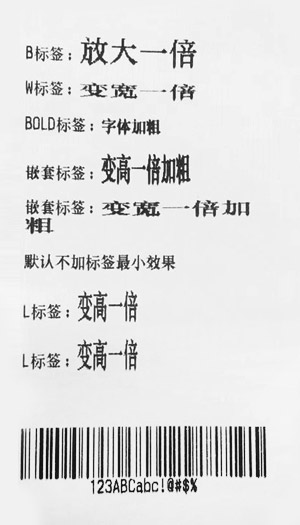
Layout and alignment effect diagram:
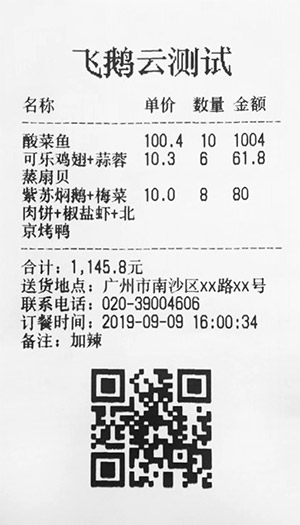

Response Parameters:

parameter name Type Description
data string The order ID is returned correctly.

Return example:

Success Response:

  1. {
  2. "msg":"ok",
  3. "ret":0,
  4. "data":"816501678_20160919184316_1419533539",
  5. "serverExecutedTime":3
  6. }

Fail Response:

  1. {
  2. "msg":"Parameter error: parameter value cannot pass null character",
  3. "ret":-2,
  4. "data":null,
  5. "serverExecutedTime":37
  6. }

Label machine printing order, Open_printLabelMsg

Function description:

Send the order content that the user needs to print to the Feiyeyun label printer (this interface can only be used by the label machine, please do not use this interface for other printers)

Request URL:

https://api.de.feieyun.com/Api/Open/printLabelMsg

Request method:

POST (recommended), GET

pay attention:

1. The request written by the developer is submitted in a form. The request header needs to use Content-Type: application/x-www-form-urlencoded. If you need to print a picture, the request header needs to use Content-Type: multipart/form-data , Please do not submit data in other ways;
2. 1mm=8dots.

Public parameters:
All requests must pass parameters.
Parameter name Required Type Description
user Y string The registered user name of Feiye Cloud background.
stime Y int The current UNIX timestamp, 10 digits, accurate to the second.
sig Y string After concatenating the parameter user+UKEY+stime (the + sign indicates the connector), perform SHA1 encryption to obtain the signature, which is a 40-bit lowercase string.
apiname Y string Requested interface name: Open_printLabelMsg
debug N string debug=1 returns data in non-json format. Only used for testing.

Private parameters:

parameter name Required Type Description
sn Y string Printer number
content content
or
contents
string Print content, cannot exceed 5000 bytes
contents content
or
contents
string
times N int The number of prints, the default is 1.
img N binary Image binary data, need to be used with the <IMG> tag, the best effect is a square (width and height are multiples of 8) black and white images not larger than 224px, supports jpg, png, bmp, and cannot exceed 10K

Typesetting control label description:

  1. <FEED> : paper feed

  2. <SIZE>width,height</SIZE> :
    set the width and height of the label paper, width label paper width (excluding backing paper), height label paper height (excluding backing paper), unit mm, such as <SIZE>30 ,20</SIZE>

  3. <GAP>m,n</GAP> :
    Set the vertical gap distance between two rolls of label paper, m the vertical distance between the two label papers 0≤m≤25.4(mm), n vertical gap offset n≤label paper Paper length, in mm,
    such as <GAP>7.62,-2.54</GAP>

  4. <DIRECTION>n</DIRECTION> :
    Set the direction of paper output and print fonts during printing, n 0 or 1, it will be initialized to 0 value setting every time the device is restarted, 1: forward paper output, 0: reverse output Paper,
    such as <DIRECTION>1</DIRECTION>

  5. <IMG x="10" y="100"> : To
    print a picture, it needs to be used in conjunction with the binary data of the uploaded img picture (one order can only be printed once), where the attribute x is the coordinate of the starting point in the horizontal direction (default is 0),
    Attribute y is the starting point coordinate in the vertical direction (default is 0)

  6. <QR x="10" y="100" e="L" w="5">QR code content</QR> :
    Print the QR code, where the attribute x is the coordinate of the starting point in the horizontal direction (default is 0 ), the attribute y is the vertical starting point coordinate (default is 0), the attribute e is the error correction level:
    L 7%M 15%Q 25%H 30% (the default is L), the attribute w is the width of the QR code (default For 5)

  7. <TEXT x="10" y="100" font="12" w="2" h="2" r="0">Text content</TEXT> :
    Print the text, where the attribute x starts from the horizontal direction The starting point coordinate (default is 0), the attribute y is the vertical starting point coordinate (default is 0), and the attribute font is the font:
  8. 1, 8×12 dot alphanumeric body
    2, 12×20 dot alphanumeric body
    3, 16×24 dot alphanumeric body
    4, 24×32 dot alphanumeric body
    5, 32×48 dot alphanumeric body
    6, 14×19 dot alphanumeric OCR-B
    7, 21×27 dot alphanumeric OCR-B
    8, 14×25 dot alphanumeric OCR-A
    9, 9×17 dot alphanumeric
    10, 12×24 dot alphanumeric
    11 , Traditional Chinese 24×24Font (big five code)
    12. Simplified Chinese 24×24Font (GB code)
    13. Korean 24×24Font (KS code) The

    default is 12 Simplified Chinese 24×24Font (GB code), the attribute w is the text width Magnification 1-10 (default is 1), attribute h is the height of the text, magnification 1-10
    attribute r is the rotation angle of the text (clockwise):
    0 0 degrees
    90 90 degrees
    180 180 degrees
    270 270 degrees
    (The default is 0)

  9. <BC128 x="10" y="100" h="80" s="1" r="0" n="1" w="1">12345678</BC128>:Print code128 one-dimensional code, Where the attribute x is the
    coordinate of the starting point in the horizontal direction (default is 0), the attribute y is the coordinate of the starting point in the vertical direction (the default is 0), whether the attribute s is readable by the human eye: 0 unrecognizable, 1 recognizable (default 1),
    The attribute n is the width of the narrow bar, expressed in dots (default is 1), the attribute w is the width of the wide bar (default is 1), expressed in dots, and the attribute r is the text rotation angle
    (clockwise):
    0 0 degrees
    90 90 degrees
    180 180 degrees
    270 270 degrees
    (default is 0)

  10. <BC39 x="10" y="100" h="80" s="1" r="0" n="1" w="1">12345678</BC39>:Print code39 one-dimensional code, Where the attribute x is the
    coordinate of the starting point in the horizontal direction (the default is 0), the attribute y is the coordinate of the starting point in the vertical direction (the default is 0), whether the attribute s is readable by the human eye: 0 unrecognizable, 1 recognizable (default 1), The attribute
    n is the narrow bar width, expressed in dots (default is 1), the attribute w is the wide bar width (default is 2), expressed in dots, and the attribute r is the text rotation angle (clockwise
    direction):
    0 0 degrees
    90 90 degrees
    180 180 degrees
    270 270 degrees
    (default is 0)

  11. <LOGO x="10" y="100"> : Print LOGO command (provided that the LOGO picture is built in the machine in advance), where attribute x is the coordinate of the starting point in the horizontal direction (default is 0), and
    attribute y is the starting point in the vertical direction Coordinates (default is 0)
To print an example of the order effect, click to download the following function reference. If you have other technical questions, please join the Fei Go API Open Platform 5 group: 146903613.

Label Printing Machine Order example Download

Example picture of sticker machine effect:
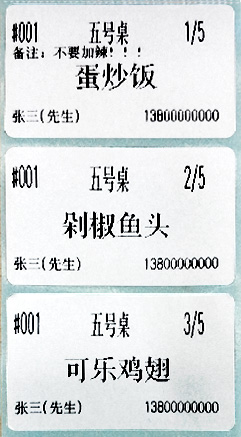

Response Parameters:

parameter name Type Description
data string The order ID is returned correctly.

Return example:

Success Response:

  1. {
  2. "msg":"ok",
  3. "ret":0,
  4. "data":"816501678_20160919184316_1419533539",
  5. "serverExecutedTime":3
  6. }

Fail Response:

  1. {
  2. "msg":"Parameter error: parameter value cannot pass null character",
  3. "ret":-2,
  4. "data":null,
  5. "serverExecutedTime":37
  6. }

Delete batch printers, Open_printerDelList

Function description:

Delete batch printer

Request URL:

https://api.de.feieyun.com/Api/Open/printerDelList

Request method:

POST (recommended), GET

Public parameters:
All requests must pass parameters.
Parameter name Required Type Description
user Y string The registered user name of Feiye Cloud background.
stime Y int The current UNIX timestamp, 10 digits, accurate to the second.
sig Y string After concatenating the parameter user+UKEY+stime (the + sign indicates the connector), perform SHA1 encryption to obtain the signature, which is a 40-bit lowercase string.
apiname Y string Requested interface name: Open_printerDelList
debug N string debug=1 returns data in non-json format. Only used for testing.

Private parameters:

parameter name Required Type Description
snlist Y string Printer number, please use minus sign "-" to connect multiple printers.

Response Parameters:

parameter name Type Description
data array Return 1 array, including success and failure information, see the example for details.

Return example:

Success Response:

  1. {"ok":["800000777success","915500104success"],"no":["800000777Verification failed: the printer number is illegal"]}

Fail Response:

  1. {
  2. "msg":"Parameter error: parameter value cannot pass null character",
  3. "ret":-2,
  4. "data":null,
  5. "serverExecutedTime":37
  6. }


Modify printer information, Open_printerEdit

Function description:

Modify printer information.

Request URL:

https://api.de.feieyun.com/Api/Open/printerEdit

Request method:

POST (recommended), GET

Public parameters:
All requests must pass parameters.
Parameter name Required Type Description
user Y string The registered user name of Feiye Cloud background.
stime Y int The current UNIX timestamp, 10 digits, accurate to the second.
sig Y string After concatenating the parameter user+UKEY+stime (the + sign indicates the connector), perform SHA1 encryption to obtain the signature, which is a 40-bit lowercase string.
apiname Y string Requested interface name: Open_printerEdit
debug N string debug=1 returns data in non-json format. Only used for testing.

Private parameters:

parameter name Required Type Description
sn Y string Printer number
name Y string Printer remark name
phonenum N string Printer flow card number

Response Parameters:

parameter name Type Description
data bool Returns true correctly.

Return example:

Success Response:

  1. {
  2. "msg":"ok",
  3. "ret":0,
  4. "data":true,
  5. "serverExecutedTime":9
  6. }

Fail Response:

  1. {
  2. "msg":"Parameter error: incorrect time format",
  3. "ret":1001,
  4. "data":null,
  5. "serverExecutedTime":37
  6. }

Empty the queue to be printed, Open_delPrinterSqs

Function description:

Modify printer information.

Request URL:

https://api.de.feieyun.com/Api/Open/delPrinterSqs

Request method:

POST (recommended), GET

Public parameters:
All requests must pass parameters.
Parameter name Required Type Description
user Y string The registered user name of Feiye Cloud background.
stime Y int The current UNIX timestamp, 10 digits, accurate to the second.
sig Y string After concatenating the parameter user+UKEY+stime (the + sign indicates the connector), perform SHA1 encryption to obtain the signature, which is a 40-bit lowercase string.
apiname Y string Requested interface name: Open_delPrinterSqs
debug N string debug=1 returns data in non-json format. Only used for testing.

Private parameters:

parameter name Required Type Description
sn Y string Printer number

Response Parameters:

parameter name Type Description
data bool Returns true correctly.

Return example:

Success Response:

  1. {
  2. "msg":"ok",
  3. "ret":0,
  4. "data":true,
  5. "serverExecutedTime":9
  6. }

Fail Response:

  1. {
  2. "msg":"Parameter error: incorrect time format",
  3. "ret":1001,
  4. "data":null,
  5. "serverExecutedTime":37
  6. }

Query whether the order is printed successfully, Open_queryOrderState

Function description:

According to the order ID, to check whether the order is printed successfully, the order ID is returned by the interface Open_printMsg

Request URL:

https://api.de.feieyun.com/Api/Open/queryOrderState

Request method:

POST (recommended), GET

Public parameters:
All requests must pass parameters.
Parameter name Required Type Description
user Y string The registered user name of Feiye Cloud background.
stime Y int The current UNIX timestamp, 10 digits, accurate to the second.
sig Y string After concatenating the parameter user+UKEY+stime (the + sign indicates the connector), perform SHA1 encryption to obtain the signature, which is a 40-bit lowercase string.
apiname Y string Requested interface name: Open_queryOrderState
debug N string debug=1 returns data in non-json format. Only used for testing.

Private parameters:

parameter name Required Type Description
orderid Y string Order ID, returned by the interface Open_printMsg.

Response Parameters:

parameter name Type Description
data bool Return true if printed, false if not printed.

Return example:

Success Response:

  1. {
  2. "msg":"ok",
  3. "ret":0,
  4. "data":true,
  5. "serverExecutedTime":2
  6. }

Fail Response:

  1. {
  2. "msg":"Parameter error: parameter value cannot pass null character",
  3. "ret":-2,
  4. "data":null,
  5. "serverExecutedTime":37
  6. }

Query the order statistics of the specified printer for a certain day, Open_queryOrderInfoByDate

Function description:

Query the order details of the specified printer for a certain day, and return the number of printed orders and the number of waiting to be printed.

Request URL:

https://api.de.feieyun.com/Api/Open/queryOrderInfoByDate

Request method:

POST (recommended), GET

Public parameters:
All requests must pass parameters.
Parameter name Required Type Description
user Y string The registered user name of Feiye Cloud background.
stime Y int The current UNIX timestamp, 10 digits, accurate to the second.
sig Y string After concatenating the parameter user+UKEY+stime (the + sign indicates the connector), perform SHA1 encryption to obtain the signature, which is a 40-bit lowercase string.
apiname Y string Requested interface name: Open_queryOrderInfoByDate
debug N string debug=1 returns data in non-json format. Only used for testing.

Private parameters:

parameter name Required Type Description
sn Y string Printer number
date Y string Query date, format YY-MM-DD, such as: 2016-09-20

Response Parameters:

parameter name Type Description
data array Returns the number of printed orders and the number of waiting to be printed.

Return example:

Success Response:

  1. {
  2. "msg":"ok",
  3. "ret":0,
  4. "data":{"print":6,"waiting":1},
  5. "serverExecutedTime":9
  6. }

Fail Response:

  1. {
  2. "msg":"Parameter error: incorrect time format",
  3. "ret":1001,
  4. "data":null,
  5. "serverExecutedTime":37
  6. }

Get the status of a printer, Open_queryPrinterStatus

Function description:

Query the status of the specified printer, and return the online or offline, normal or abnormal information of the printer.

Request URL:

https://api.de.feieyun.com/Api/Open/queryPrinterStatus

Request method:

POST (recommended), GET

Public parameters:
All requests must pass parameters.
Parameter name Required Type Description
user Y string The registered user name of Feiye Cloud background.
stime Y int The current UNIX timestamp, 10 digits, accurate to the second.
sig Y string After concatenating the parameter user+UKEY+stime (the + sign indicates the connector), perform SHA1 encryption to obtain the signature, which is a 40-bit lowercase string.
apiname Y string Requested interface name: Open_queryPrinterStatus
debug N string debug=1 returns data in non-json format. Only used for testing.

Private parameters:

parameter name Required Type Description
sn Y string Printer number

Response Parameters:

parameter name Type Description
data string Return printer status information. There are three types:
1. Offline.
2. Online and working normally.
3. Online, the working status is abnormal.
Note: The abnormality is generally paperless, and the offline judgment is that the printer has lost contact with the server for more than 2 minutes.

Return example:

Success Response:

  1. {
  2. "msg":"ok",
  3. "ret":0,
  4. "data":"The online working condition is normal",
  5. "serverExecutedTime":9
  6. }

Fail Response:

  1. {
  2. "msg":"Parameter error: incorrect time format",
  3. "ret":1001,
  4. "data":null,
  5. "serverExecutedTime":37
  6. }

Get the device type information,Open_getModel

Function description:

Query the hardware type of the specified device(eg: Printer/ Desktop Label Printer).This interface does not verify binding relationships. It is recommended to use it to obtain the device hardware type before device addition.

Request URL:

https://api.de.feieyun.com/Api/Open/getModel

Request method:

POST

Public parameters:
All requests must pass parameters.
Parameter name Required Type Description
user Y string The registered user name of Feiye Cloud background.
stime Y int The current UNIX timestamp, 10 digits, accurate to the second.
sig Y string After concatenating the parameter user+UKEY+stime (the + sign indicates the connector), perform SHA1 encryption to obtain the signature, which is a 40-bit lowercase string.
apiname Y string Requested interface name: Open_getModel
debug N string debug=1 returns data in non-json format. Only used for testing.

Private parameters:

parameter name Required Type Description
sn Y string Device number
key Y string Device key

Response Parameters:

parameter name Type Description
data string model,Return the device type, There are five types:
0: 58mm thermal printer
1: 80mm thermal printer
2: Label Printer
3: Barcode scanning device
4: 58mm printer and barcode scanner

Return example:

Success Response:

  1. {
  2. "msg":"ok",
  3. "ret":0,
  4. "data":
    1. {
    2. "model":2
    3. },
  5.   "serverExecutedTime":19
  6. }

Fail Response:

  1. {
  2. "msg":"Parameter error: incorrect time format",
  3. "ret":1001,
  4. "data":null,
  5. "serverExecutedTime":37
  6. }

Feie Cloud API-Java Edition

click to download

Feie Cloud API-PHP Version

click to download

Feie Cloud API-NodeJS Edition

click to download

Feie Cloud API-C# Edition

click to download

Feie Cloud API-Python Edition

click to download

Feie Cloud API-Ruby Edition

click to download

Feie Cloud API-Go Edition

click to download

Feie Cloud API-WeChat Mini Program

click to download

If you have other technical questions, please join the Fei Go API open platform QQ5 group: 146903613, or call the company's customer service number 020-39004606

Public parameter exception

status Return code JSON returned Coding analysis Solution
SIG error -3 USER, UKEY, time stamp error {"ret":-3,"msg":"Verification failed: Signature is wrong","data":null,"serverExecutedTime":0} Verification failed: signature error Check if UKEY is correct (UKEY is not the printer's key), please delete the space, UKEY is in the personal center of the management background (http://admin.feieyun.com/)
The time stamp is too different from the standard time -3 stime parameter value error {"ret":-3,"msg":"Validation failure: request timed out","data":null,"serverExecutedTime":0} Authentication failed: request timed out. The stime parameter of the interface is abnormal, which is too different from the current Beijing time. Correct the server time and the code can get the correct timestamp.
Parameter is empty -2 Parameter is empty {"ret":-2,"msg":"Parameter error: parameter value cannot pass null character","data":null,"serverExecutedTime":0} Parameter error: parameter value cannot pass null character Check code debugging and provide normal parameters
Incorrect account name or request header -2 Incorrect account name or request header {"ret":-2,"msg":"Parameter error: the account is not registered","data":null,"serverExecutedTime":0} Parameter error: The account is not registered The account number is incorrect, the request header is incorrect, you can download the official SDK test comparison reference
ID and user do not match -1 The printer number and user do not match. {"ret":-1,"msg":"Verification failed: Printer Sn and User do not match","data":null,"serverExecutedTime":0} Printer number and user do not match The printer number is not bound to the current Feie Cloud account, please check the current number binding and fill in the correct number

Add printer interface

status Return code JSON returned Coding analysis Solution
success 0 Added successfully {"msg":"ok","ret":0,"data":{"ok":["123456789#qw3rtyui"],"no":[]},"serverExecutedTime":6} success
added 0 The printer has been added {"ret":0,"msg":"ok","data":{"ok":[],"no":["123456789#qw3rtyui(error: added)"]},"serverExecutedTime":0} Error: Already added The current printer has been bound to this account, the code judges that there is no need to add it again
failure 1001 Parameter error {"ret":1001,"msg":"Batch parameter cannot be empty","data":null,"serverExecutedTime":0} Parameter error: The content added in batch cannot be empty. Check the interface code, do not pass a null value
failure 1001 Wrong KEY of printer {"ret":1001,"msg":"The printer Sn 123456789 and KEY are incorrect","data":null,"serverExecutedTime":0} The printer Sn 123456789 and KEY are incorrect Please fill in the correct printer key
failure 1001 The printer's SN and KEY are wrong {"ret":1001,"msg":"Verification failed: printer Sn and KEY do not match","data":null,"serverExecutedTime":0} Verification failed: printer Sn and KEY do not match Please fill in the correct printer number and key

Print order interface

status Return code JSON returned Coding analysis Solution
success 0 The interface returns the order ID {"ret":0,"msg":"ok","data":"5f9929cf994aa222485b172b","serverExecutedTime":0} success
failure -2 Order content exceeds 5000 words {"ret":-2,"msg":"Parameter error: Printing error. Printing content exceeds 5000 bytes","data":null,"serverExecutedTime":0} Parameter error: print failed, the print content exceeds 5000 bytes If it exceeds 5000 bytes, judge the program code, and divide it into two orders and send it to the printer for printing.

Delete printer interface

status Return code JSON returned Coding analysis Solution
success 0 Delete correctly {"ret":0,"msg":"ok","data":{"ok":["123456789"],"no":[]},"serverExecutedTime":0} success
failure 0 The printer number is not under the current account {"ret":0,"msg":"ok","data":{"ok":[],"no":["123456789"]},"serverExecutedTime":0} Failed to delete Please check if the printer Sn is under the current account
failure 1002 Printer number and user do not match {"ret":1002,"msg":"Verification failed: The printer Sn is illegal","data":null,"serverExecutedTime":0} Verification failed: The printer Sn is illegal Please fill in the correct printer Sn

Modify printer information interface

status Return code JSON returned Coding analysis Solution
success 0 Successfully modified {"msg":"ok","ret":0,"data":true,"serverExecutedTime":3} success
failure 1002 Printer number and user do not match {"ret":1002,"msg":"Verification failed: The printer Sn is illegal","data":null,"serverExecutedTime":0} Verification failed: The printer Sn is illegal Please fill in the correct printer Sn

Clear the print queue interface

status Return code JSON returned Coding analysis Solution
success 0 Empty correctly {"msg":"ok","ret":0,"data":true,"serverExecutedTime":4} success
failure 1002 Printer Sn is illegal {"ret":1002,"msg":"Verification failed: The printer Sn is illegal","data":null,"serverExecutedTime":0} Verification failed: The printer Sn is illegal Check the interface code and fill in the correct printer number

Interface to query whether the order is printed successfully

status Return code JSON returned Coding analysis
Printed 0 Printed {"msg":"ok","ret":0,"data":true,"serverExecutedTime":3} Printed
Not printed 0 Not printed {"msg":"ok","ret":0,"data":false,"serverExecutedTime":3} Not printed

Query the printer's order statistics interface for a certain day

status Return code JSON returned Coding analysis Solution
failure -2 Enter date is empty {"ret":-2,"msg":"Parameter error: parameter value cannot pass null character","data":null,"serverExecutedTime":0} Parameter error: parameter value cannot pass null characters Check the interface code, do not pass a null value
failure -2 Time format is incorrect {"ret":-2,"msg":"Parameter error: time format is incorrect","data":null,"serverExecutedTime":0} Parameter error: time format is incorrect Please fill in the correct time format
success 0 print printed quantity
waiting unprinted quantity
{"msg":"ok","ret":0,"data":{"print":6,"waiting":1},"serverExecutedTime":9} print printed quantity
waiting unprinted quantity

Query printer status interface

status Return code JSON returned Coding analysis
Online 0 Online {"ret":0,"msg":"ok","data":"The online working condition is normal","serverExecutedTime":0} Online, working normally
Offline 0 Offline {"ret":0,"msg":"ok","data":"off-line","serverExecutedTime":0} Offline
Online, paper abnormal 0 Online, paper abnormal {"ret":0,"msg":"ok","data":"The online working state is abnormal","serverExecutedTime":0} Online, working abnormally
Copyright © 2014-2020 feieyun Inc. All rights reserved Guangdong ICP No. 14027147-4

暂无提供下载

说明书更新中,敬请期待!